Schedule your classes 10x faster with Import/Export & Duplicate Schedule
In this guide, we’ll walk through what each option is best for, when to use them, and how they can help your team save time on class scheduling.
Planning your class schedule sounds simple enough, until you actually have to do it. 😆
You’re arranging class times, checking instructor availability, updating locations, adjusting capacities, and making sure everything goes live at the right time. Then next week comes, and suddenly you’re doing the same thing all over again.
For many studios, this becomes one of those repetitive admin tasks that quietly eats up hours.
That’s exactly why Rezerv gives you faster ways to create and manage class schedules: Import/Export Class Schedule and Duplicate Schedule.
In this guide, we’ll walk through what each option is best for, when to use them, and how they can help your team save time on class scheduling. Then, once you know which method fits your workflow, you can head to our Support Center for the step-by-step setup guide.
Why class scheduling takes so much time
Class scheduling may look simple, but there are usually a lot of details behind every class on your calendar.
You need to confirm instructor availability, assign the right location or facility, set capacity, manage waitlists, check booking rules, and make sure the schedule is published at the right time. When you have multiple instructors, outlets, or recurring classes, those small tasks can quickly pile up.
For some teams, the challenge is coordination. Staff or instructors may need to help plan the schedule, but they do not always have access to the Business Portal. So availability often gets collected through messages, spreadsheets, or group chats before someone manually adds everything into the system.
For other teams, the challenge is repetition. The weekly timetable may already be set, but rebuilding the same classes again still takes time, especially when each class has its own details and settings.
That is why a faster scheduling workflow matters.
Instead of adding every class manually or repeating the same admin work week after week, Rezerv gives you different ways to plan, repeat, and manage class schedules more efficiently.
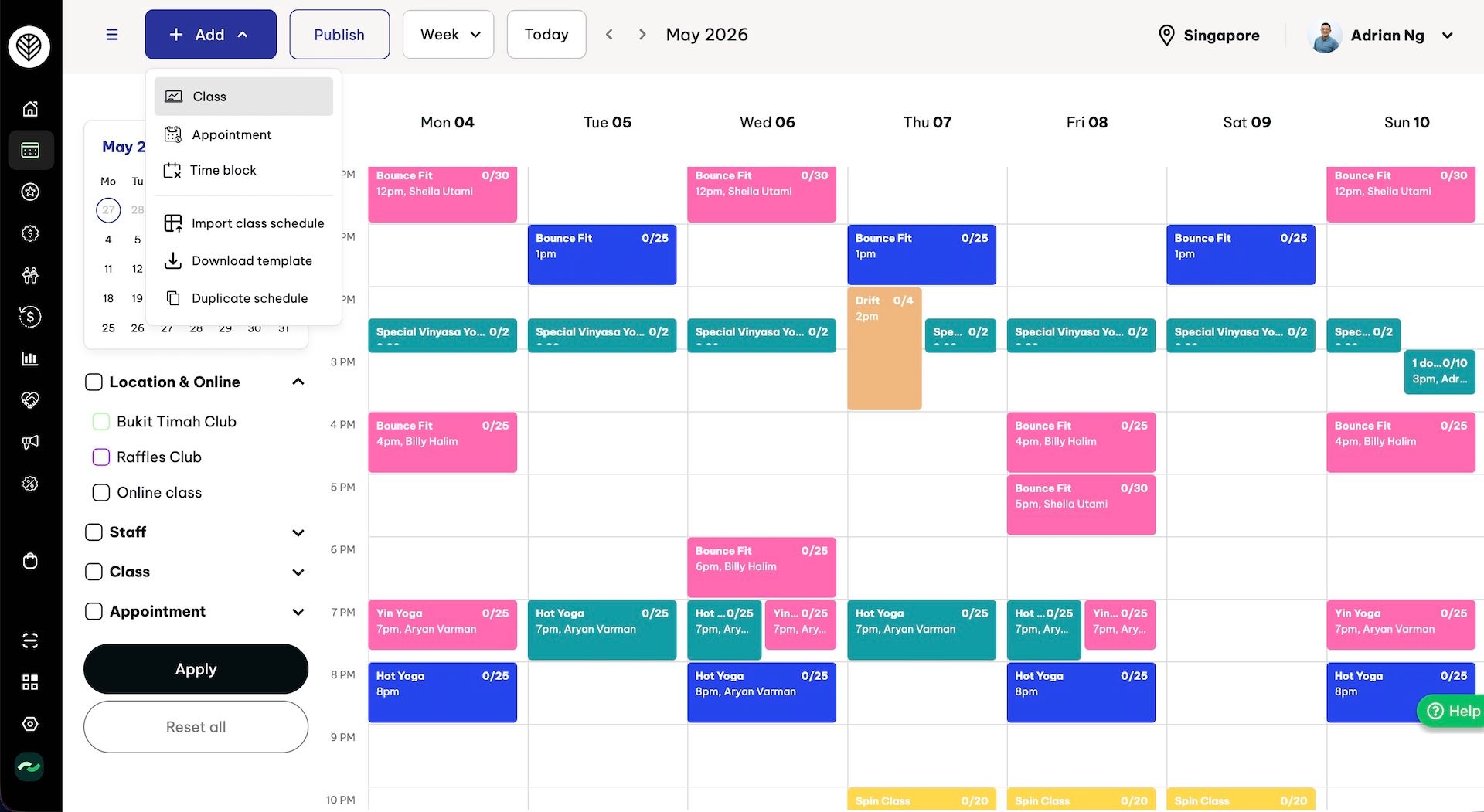
Two faster ways to schedule classes in Rezerv
Rezerv gives you two faster ways to manage class scheduling, depending on how your team works.
- If your team plans schedules outside the Business Portal, Import/Export Class Schedule is the better fit. You can download a spreadsheet template, let your staff or instructors add/review their availability, review the schedule, then upload it back into Rezerv to create multiple class schedules at once. It also makes team coordination easier because instructors and staff can help update the schedule file without needing access to the Business Portal.
- If your timetable is already set, Duplicate Schedule helps you repeat it faster. Instead of rebuilding the same classes one by one, you can duplicate an existing schedule into future dates. This copies the full schedule setup, including class details, location, staff, capacity, publish settings, booking rules, cancellation rules, and other advanced settings.
So the main question is simple:
How does your team usually build and manage schedules?
If your team plans in bulk and needs input from multiple people, Import/Export Class Schedule will likely be the better fit.
If your timetable is already set and you want to repeat it without rebuilding every detail from scratch, Duplicate Schedule will help you move much faster.
1. Use Import/Export Schedule when you need to plan in bulk
If your schedule isn’t something you can just repeat every week, and instead needs input from multiple people, adjustments, and planning ahead, this is the workflow you’ll want to use.
This is especially helpful if your schedule involves multiple instructors, different class types, several locations, or rotating availability from week to week. Instead of creating each class one by one inside the Business Portal, you can plan everything in an Excel template first, then upload the completed schedule back into Rezerv.
It gives your team more room to plan properly before anything goes live.
.png)
a. What is Import/Export Class Schedule?
Import/Export Class Schedule allows you to create multiple class schedules at once using an Excel template.
You can use a blank template as your starting point or export an existing schedule and adjust it from there. This is helpful when you want to plan a full week, bi-weekly schedule, or even a full month’s timetable in one go. The template also includes dropdowns based on your Rezerv account, such as classes, staff, locations, and facilities, which helps reduce manual typing mistakes.
.png)
Once the schedule is prepared, you can upload it back into Rezerv, preview the schedule, check for issues, and publish the valid schedules in bulk.
b. When should you use Import/Export Class Schedule?
This feature is a good fit when:
- You want to plan many classes at once
- You need instructors to share their availability
- Your staff needs to review the timetable without accessing the Business Portal
- Your team prefers planning in Excel
- You manage rotating instructors
- You run multiple classes, locations, or facilities
- You want to reduce one-by-one schedule creation
It is especially helpful for teams that need a more collaborative scheduling workflow. Instead of sending messages back and forth, your team can work from one spreadsheet before the final schedule is uploaded.
c. Why this helps your team
Bulk scheduling saves time, but the bigger benefit is control.
In many studios, the business owner or admin is not the only person involved in scheduling.
You may need instructors to confirm their availability. You may need staff to help organize the weekly timetable. You may need your team to check the schedule before it is added into the system.
The problem is, not every instructor or staff member needs access to the Business Portal.
That’s where Import/Export Class Schedule becomes useful. You can export the schedule template, share it with the right people, and let them check or update the details directly in Excel. Your team can help with planning without needing to log in to the Business Portal or access the full schedule feature.
This makes the process easier, especially for businesses that still rely on spreadsheets, WhatsApp messages, or back-and-forth chats to collect availability.
d. Best-fit scenario
A Pilates studio is planning next month’s timetable with several instructors.
Instead of asking each instructor to message their availability separately through WhatsApp, the admin shares the Excel schedule template. Each instructor can check or update their available times in the spreadsheet. After the schedule is finalized, the admin uploads it into Rezerv, reviews the preview, and publishes the approved classes.
The result: the team can plan together, while the admin still controls the final schedule inside Rezerv.
.jpeg)
2. Use Duplicate Schedule when your timetable already works
Duplicate Schedule is best for businesses that already have a full timetable they’re happy with.
Maybe your yoga studio runs Beginner Yoga in the morning, afternoon, and evening. Maybe Hatha Yoga happens every Monday and Wednesday. Maybe Restorative Yoga runs every evening, while private sessions and instructor-led specialty classes are placed throughout the week. Different instructors, different rooms, different capacities, and different booking rules across the week.
That kind of schedule takes time to build properly.
So once you’ve created a timetable that works, you shouldn’t have to rebuild the whole thing from scratch again and again.
With Duplicate Schedule, you can duplicate an entire schedule or selected date range into future dates. This means you can take a full weekly, or monthly structure, repeat it for the next week, month or another upcoming period, then make small adjustments only where needed.
.png)
a. What is Duplicate Schedule?
Duplicate Schedule allows you to copy an existing timetable or selected date range into future dates.
You can duplicate up to 31 days of schedules at a time, choose all locations or selected outlets, and set the start date for the new duplicated schedule.
You can also decide how the new schedule should be published. If you want clients to see it right away, you can publish it immediately. If you want to prepare the schedule in advance, you can set it to publish later at a specific date and time.
The real power of Duplicate Schedule is that it carries over the details attached to your existing schedule.
So if your timetable includes specific class settings, those details can be copied too, such as:
- Class type
- Start time and duration
- Location and facility
- Assigned staff or instructor
- Class capacity and waitlist
- Publish settings
- Private class settings
- Booking window
- Check-in window
- Late cancellation rules
- Auto-cancel rules
- And other settings
This is especially useful when your schedule has a lot of moving parts. You don’t have to manually recreate the same rules and settings across every class again.
b. When should you use Duplicate Schedule?
Duplicate Schedule is especially helpful for businesses with busy timetables, because it lets you reuse a full schedule structure instead of recreating each class manually.
- You already have a complete timetable you want to reuse
- Your schedule stays mostly the same
- You want to repeat a full week, month or selected date range
- You run many classes across different times, instructors, rooms, or locations
- You want to keep schedule details and settings consistent
- You want to plan future schedules ahead of time
Duplicate Schedule is especially helpful for studios with a consistent rhythm. Once your timetable is set, you can duplicate it into the next week or month, then make small adjustments only where needed.
c. Why this helps your team
Duplicate Schedule saves time by reducing repetitive schedule setup.
For businesses with packed timetables, rebuilding a full schedule can take hours. Your team may need to recreate dozens of classes, assign instructors, choose facilities, set capacities, update booking rules, adjust publish settings, and check each class before it goes live.
With Duplicate Schedule, your existing timetable becomes the starting point for your next schedule. The full structure is carried over, along with the details and settings attached to each class.
It also gives your team more control when planning ahead. You can duplicate a schedule into future dates, review the copied timetable, adjust any special changes, and decide when clients should be able to see and book those classes.
d. Best-fit example
A yoga studio runs a full weekly timetable with different classes throughout the day.
On Monday, they have morning Beginner Yoga, afternoon Private Yoga, and evening Restorative Yoga. On Wednesday, they run Hatha Yoga and instructor-led sessions. Across the rest of the week, they have a mix of regular group classes, private classes, and evening sessions.
Instead of recreating each class for the next week, the admin duplicates the full weekly schedule into the next date range. The duplicated timetable keeps the class times, instructors, facilities, capacities, booking rules, and other settings attached to each class.
After that, the admin only needs to review the new schedule, adjust any special changes, and publish it when ready.
The result: the studio can prepare future timetables faster without rebuilding the same weekly schedule from zero.
Import/Export vs Duplicate Schedule: Which one should you use?
Both Import/Export Class Schedule and Duplicate Schedule help you create class schedules faster, but they are useful for different planning situations.
A simple way to think about it:
If you’re still planning the schedule, use Import/Export Class Schedule.
If the schedule already works and you want to repeat it, use Duplicate Schedule.
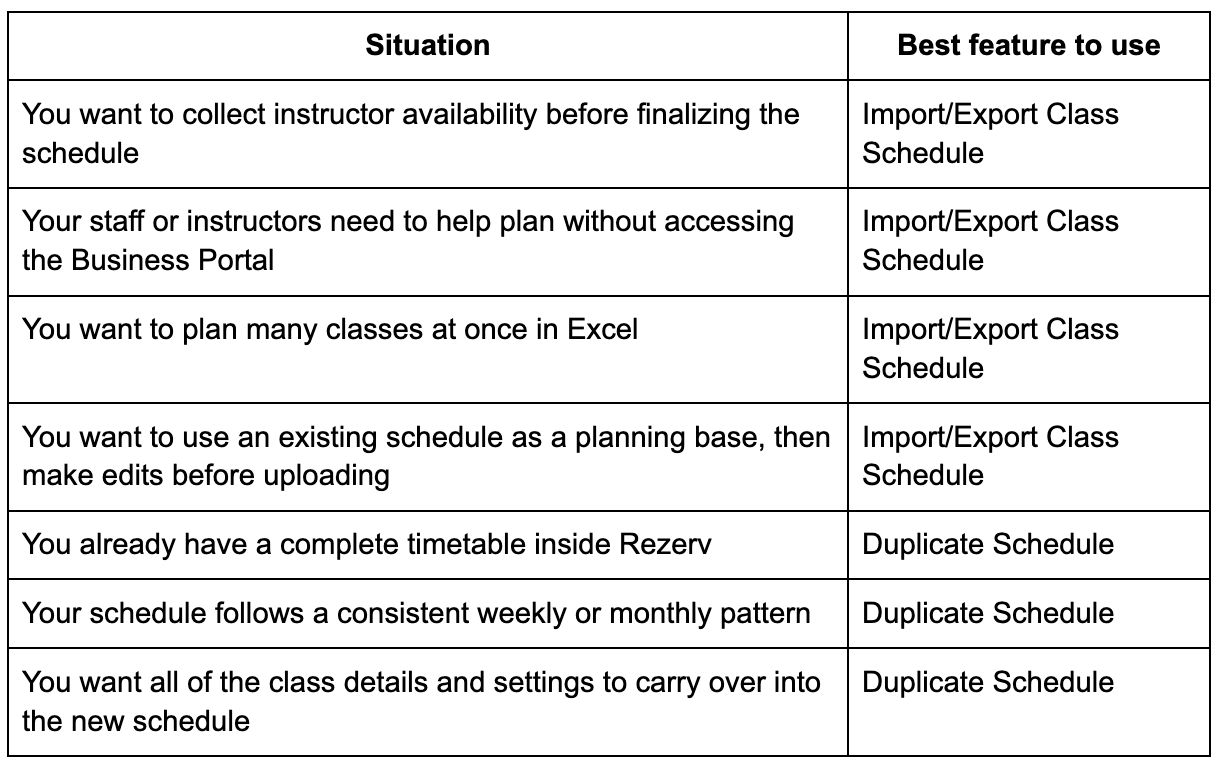
a. When Import/Export Class Schedule makes more sense
Choose Import/Export Class Schedule when your schedule is still in the planning stage.
This is helpful when you need input from different team members, such as instructors sharing their availability or staff reviewing the upcoming timetable. Instead of giving every team member access to the Business Portal, you can use the spreadsheet as a shared planning file.
Once the schedule is ready, your admin team can upload the finalized version into Rezerv and review everything before publishing.
b. When Duplicate Schedule makes more sense
Duplicate Schedule is the better choice when your existing timetable already works and you want to reuse it.
This is useful when your schedule follows a consistent rhythm, your class details are already set up, and your team mainly needs to repeat the same structure into future dates.
The benefits of using Import/Export and Duplicate Schedule
Class scheduling can take hours when everything has to be created, checked, and updated manually. Import/Export Class Schedule and Duplicate Schedule help your team cut down that work by giving you faster ways to plan, repeat, review, and publish timetables in Rezerv.
1. Less one-by-one schedule creation
Manually adding classes one at a time can become tiring fast, especially when your business runs a full timetable every week.
With Import/Export Class Schedule, your team can prepare multiple class schedules in one spreadsheet and upload them in bulk. With Duplicate Schedule, you can repeat an existing timetable into future dates, instead of rebuilding the same schedule again.
Both features help your team spend less time on repetitive setup and more time on the work that actually needs attention.
2. Easier planning with your team
When your schedule depends on instructor availability, planning can easily turn into a long back-and-forth process.
Import/Export Class Schedule makes this easier because staff or instructors can help review or update the spreadsheet without needing access to the Business Portal. They can check their availability, add input, or review the planned timetable in Excel, while your admin team stays in control of what gets uploaded and published in Rezerv.
This keeps the process more organized, especially for teams with rotating instructors or multiple people involved in scheduling.
3. Faster timetable repetition
For businesses with recurring schedules, Duplicate Schedule can save a lot of time.
Instead of rebuilding your full timetable again for the next week or month, you can duplicate an existing schedule range and carry it forward. This is helpful when your business already has a complete schedule structure that works and only needs small adjustments for future dates.
You get a ready-made starting point without having to recreate every class inside the timetable manually.
4. More consistent class details and settings
A schedule is more than class names and times. Each class can also have its own instructor, location, facility, capacity, waitlist, booking window, check-in window, cancellation rule, publish setting, and other details.
With Duplicate Schedule, these details and settings can be carried over with the duplicated timetable. This helps your team keep schedules consistent and reduces the chance of missing small but important settings.
With Import/Export Class Schedule, the spreadsheet template with dropdown also helps reduce manual errors by making schedule planning more structured before the final upload.
5. More time for your business
When your team spends less time creating and repeating schedules manually, they get more time back for the things that help the business grow.
That could mean improving the client experience, planning better classes, supporting instructors, checking reports, running promotions, or simply reducing the admin load on your team.
With Rezerv, scheduling becomes a smoother workflow instead of a weekly task that takes over your day.
Want to learn how to use these features?
Now that you know how Import/Export Class Schedule and Duplicate Schedule can help you build timetables faster, the next step is learning how to use them inside Rezerv.
For the full step-by-step guide, visit our Support Center:
There, you’ll find the exact setup instructions, so you can choose the right scheduling method for your business and start creating class schedules with less manual work.
Need extra help? You can also reach out to our support team through live chat, and we’ll be happy to guide you.