Tips & Tricks: How to stop losing revenue on kids class bookings and encourage wallet payments
Learn how different pricing types in Rezerv help businesses charge the right rate for each attendee and encourage more wallet-based bookings.
Picture a Saturday morning climbing class. A parent books a spot for their 8-year-old. The kid's older sibling wants in too. And while they're at it, the parent figures they'll climb a few routes as well. Three people, three different reasons to be there, and somehow they all hit checkout at the same flat price.
You've run into this. Some attendees are actually doing the class, others are just along for the ride, and a handful want to join in too. But your booking flow only knows one price. So you either overcharge the people tagging along, undercharge the ones participating, or end up fielding refund requests and manual fixes after the fact.
It gets messier with capacity. When an accompanying parent takes up a participant spot in your system, your class limits stop reflecting who's really on the mat, in the pool, or on the wall.
Our latest update sorts this out. You can now set a different price for every type of attendee inside a single booking, keep your capacity counts accurate, and offer a lower rate for wallet payments to pull more revenue upfront. Here's how it works.
I. Why mixed-attendee bookings can get complicated
Family and group bookings can be tricky because not everyone in the booking is there for the same reason.
In a simple booking, one person books one spot, pays one price, and joins one activity. But many businesses do not operate that way. A single booking may include children, parents, siblings, guests, members, and non-members, all with different roles in the experience.
That is where the booking flow can start to feel messy.
Different attendees may need different prices
A kids class may have children who are actively joining, while parents are only staying to supervise. A family activity may include adults and children, but both groups may not have the same price. A workshop may allow participants and accompanying guests. A sports or climbing session may need different rates for adults, kids, members, and non-members.
When everyone is treated as the same type of attendee, your business may end up charging the wrong price.
For example, an accompanying parent may be charged the same price as a child who is actually joining the class. Or a child may be charged the same rate as an adult, even though your business normally offers child pricing.
The more attendee types you have, the harder it becomes to manage everything with one flat rate.
Manual pricing fixes can slow your team down
When your booking setup does not support different attendee prices clearly, your team may need to handle the difference manually.
That could mean adjusting the price after the booking is made, creating a workaround, applying a special discount, or asking the customer to make a separate booking. These small fixes may seem manageable at first, but they can quickly become repetitive as more customers book.
Over time, manual adjustments can make your booking process harder to track. Your team has to remember which price applies to which attendee, which customers need special handling, and whether the final booking amount is correct.
That adds unnecessary admin work to something that should feel simple.
Customers may feel confused during booking
From the customer’s side, the booking process should be easy to understand.
If they are booking for themselves, their child, or their family, they should be able to choose the right attendee type without needing to message your team for clarification. When pricing is unclear, customers may hesitate, choose the wrong option, or ask extra questions before completing the booking.
This can create friction at the exact moment when you want the customer to book smoothly.
A clearer pricing setup helps customers understand what they are paying for and makes the booking experience feel more natural.
Capacity can become inaccurate
Pricing is not the only issue. Capacity can also become harder to manage.
If your class has 10 participant spots, you want those spots to reflect the people who are actually joining the activity. But if accompanying adults or non-participating guests are counted the same way as participants, your class may look full even when there is still space for real participants.
For example, a kids class may have 10 available spots. If five parents accompany their children and are counted toward capacity, the class may appear to have fewer available participant spots than it really does.
This can stop other customers from booking, even though your business still has room for more participants.

II. The smarter way to price every attendee
When different people are included in one booking, your pricing should be able to match their role.
A child joining the class should not always be charged the same as an adult. A parent who is only there to accompany their child may not need the same price as someone who is actually participating. A VIP customer may also need a different rate from a standard customer.
With Rezerv, you can create different pricing types inside one booking, so each attendee can be charged more accurately.
Instead of using one flat price for everyone, your business can create attendee types such as:
- Participating Adult
- Participating Child
- Accompanying Adult
- Accompanying Child
- Member Adult
- Member Child
- Guest
This helps make the booking flow cleaner for both your team and your customers.
Instead of asking customers to make separate bookings for adults, children, members, or accompanying guests, they can choose the right attendee type within the same booking. Your business can then apply the correct price to each person without needing to handle the difference manually.
For business owners, this gives you more control over how your services are priced. You can build a pricing structure that matches your real-world booking scenarios, with each attendee charged for their role instead of a single rate applied across the whole booking.
For customers, it makes the booking process easier to understand. They can see which option applies to them, choose the correct attendee type, and complete the booking with more confidence.
That covers role: what each person is there to do. You can go a layer deeper and price by who they are to your business too.
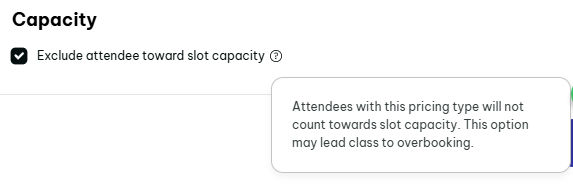
III. Keep your class capacity focused on actual participants
Pricing is only one part of the booking experience. Capacity matters too.
For many classes or group sessions, not every person in the booking should take up a participant spot. This is especially true when some attendees are only there to accompany, supervise, or support another participant.
For example, a kids class may allow parents to stay during the session. But if those parents are not actually joining the class, they should not reduce the number of available spots for children who want to participate.
Why this matters for limited-capacity classes
Let’s say your kids class has 10 available spots.
If 7 children are joining the class and 5 parents are coming along to accompany them, your actual participant count is still 7 children. But if the system counts every attendee the same way, it may look like 12 people are taking up space.
That can create problems.
Your class may appear full even though there are still participant spots available.
Customers may not be able to book even when the class can still accept more children. Your team may also need to adjust bookings manually or explain why the capacity shown in the system does not match the real session setup.
Choose which attendee types count toward capacity
With Rezerv, you can decide which pricing types should count toward slot capacity.
This means participating attendees can count toward the class limit, while accompanying attendees can be excluded from capacity if they are not taking part in the session.
For example, you may want:
- Participating Kids: count toward capacity
- Participating Adults: count toward capacity
- Accompanying Adults: excluded
- Accompanying Kids: excluded
This gives your business more control over how available spots are calculated.
A cleaner way to manage mixed-attendee bookings
This is helpful for any business where bookings involve both participants and non-participants.
A children’s art class may need to count only the children joining the class. A family workshop may need to count only the people using materials. A sports session may need to count only the players, not the parents watching from the side.
By separating attendee pricing from capacity rules, your booking setup becomes much more accurate.
Your customers can still add the right attendee types during booking, while your team can keep the class capacity focused on the people who are actually participating.
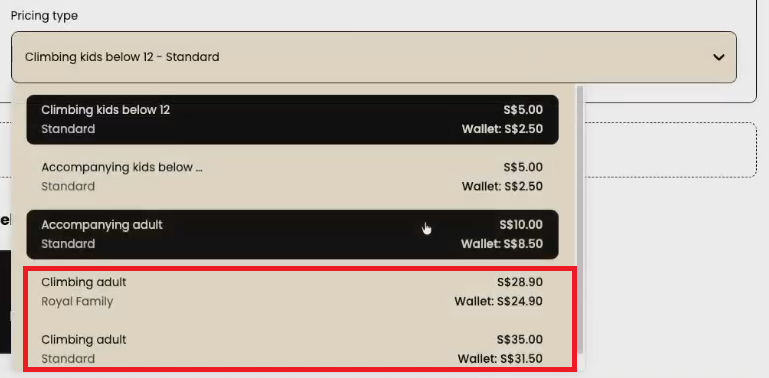
IV. Use pricing groups to offer different rates for different customers
Different pricing types help you charge based on the attendee’s role. Pricing groups help you go one step further by charging based on the customer’s relationship with your business.
This is useful because not every customer should always see the same price.
Sometimes, two people may choose the same attendee type, but they still should not pay the same price. For example, a standard customer and a VIP member may both book as a participating adult, but your business may want to give the VIP member a better rate.
For example, your business may have customer groups such as:
- Standard customers
- VIP customers
- Returning members
- Students
- Corporate customers
This gives your pricing setup more flexibility because you are not limited to one price for every attendee type.
How pricing types and pricing groups work together
Think of pricing types as the attendee category, and pricing groups as the customer category.
- A pricing type answers: “Who is joining the booking?”
- A pricing group answers: “What customer group does this person belong to?”
For example, your pricing type could be Participating Adult, but the price may still be different depending on whether the customer is a standard customer or a VIP member.
The same can apply to kids, guests, or accompanying attendees. This gives your business more room to create pricing that matches different customer segments.
Example: standard customers vs VIP members
Let’s say you run a climbing class.
You may want to create pricing types like:
- Climbing Adult
- Climbing Kid
Then, inside those pricing types, you may want to offer different rates for different pricing groups.
For example:
1. Climbing Adult
- Standard customer: $35
- VIP member: $30
2. Climbing Kid
- Standard customer: $5
- New member: $3
This means your business can keep the booking structure simple, while still offering more personalized prices behind the scenes.
Reward the customers you want to retain
Pricing groups are especially helpful if your business already offers member benefits, loyalty perks, corporate rates, student pricing, or VIP pricing.
Instead of creating separate classes or asking customers to contact your team for special rates, you can make those prices available through the right pricing setup. Customers get the price that applies to them, and your team gets fewer manual exceptions to handle.
This can also make your member benefits feel more visible. When customers know they can access better rates as part of a certain group, it gives them another reason to stay engaged with your business.
Keep special pricing easier to manage
Without pricing groups, special rates often become manual.
Your team may need to remember which customer gets which price, apply discounts manually, or explain the difference every time someone books. That can become difficult as your customer base grows.
With pricing groups, your business can organize those special rates more clearly. Once customers belong to the right group, their pricing can follow the rules you have set.
This helps reduce manual work for your team and makes the booking experience more consistent for customers.
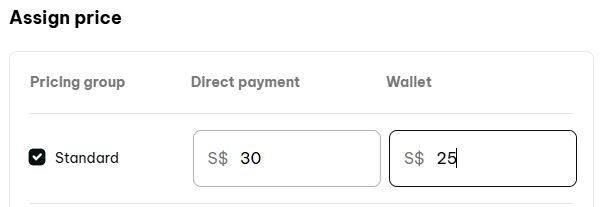
V. Offer a wallet booking discount to encourage upfront payment
Once your attendee pricing is set, you can also use pricing to guide how customers pay.
In Rezerv, you can set different prices for Direct Payment and Wallet. This means your business can offer a lower price when customers choose to pay using wallet, while keeping the regular price for direct payment.
At first, this may look like a simple discount. But strategically, a wallet booking discount can do more than make the booking cheaper. It gives customers a clear reason to top up their wallet, use their existing balance, and keep booking through a payment method that encourages repeat usage.
Why customers need a reason to use wallet
Most customers will choose the payment method that feels easiest or most familiar.
If Direct Payment and Wallet have the same price, some customers may not feel any urgency to use wallet. They may simply pay per booking because it feels natural.
But when wallet payment gives them a better price, the value becomes easier to understand.
Instead of thinking, “Why should I use wallet?” customers can immediately see the benefit: they get a better deal when they pay with wallet.
That small price difference can help make wallet payment feel more attractive at checkout.
How wallet discounts can support repeat bookings
Wallet usage can also help encourage customers to stay engaged with your business.
When customers top up their wallet, they already have balance ready for their next booking. This can make the next purchase feel easier because they do not need to go through the full payment decision every time.
For businesses that rely on repeat visits, classes, or sessions, this can be helpful. A customer with wallet balance may be more likely to book again because the money is already available inside their account.
So instead of treating wallet as just another payment option, you can use wallet pricing as a gentle way to encourage customers to come back.
Example: direct payment price vs wallet price
Let’s say you run a kids class with different attendee pricing.
Your pricing could look like this:
1. Participating Kid
- Direct Payment: $30
- Wallet: $27
2. Accompanying Adult
- Direct Payment: $10
- Wallet: $8
In this setup, customers can still choose how they want to pay. But the wallet price gives them an extra reason to use their wallet instead of paying directly.
You can apply the same idea to adult classes, family activities, workshops, sports sessions, or any booking where you want to encourage wallet usage.
VI. What this helps your business improve
Flexible attendee pricing and wallet discounts look like small booking tweaks, but they change how your business handles family bookings, group sessions, and repeat customers.
With this setup, your team builds a booking flow that's clearer, more accurate, and easier to manage, instead of leaning on manual adjustments or one flat price for everyone.
1. Clearer pricing for customers
When customers see the right attendee types during booking, they don't have to guess which option fits.
A parent picks a participating child and an accompanying adult. A family chooses adult and child pricing in the same booking. A member books at the right member rate while a guest is added at a different one. Pricing reads clearly from the start, which cuts confusion before checkout.
2. Fewer manual adjustments for your team
Without flexible pricing, your team fixes bookings after the fact, adjusting prices by hand, creating separate bookings, adding notes, or explaining special cases to customers.
Those small tasks add up fast when you handle a lot of family or group bookings.
With pricing types doing the work inside the booking flow, your team spends less time correcting prices and more time on customers.
3. More accurate class capacity
When only actual participants count toward capacity, your availability reflects reality. This matters most for kids classes, family workshops, and any session where some people are only accompanying.
Your class won't show full just because parents or observers got counted as participants, so you protect your real limits while keeping room for the right attendees.
4. More room for member and VIP pricing
If you offer special pricing for members, VIPs, students, families, or other groups, pricing groups let you manage those rates in a structured way instead of handling each one by hand.
You create clear pricing per customer group, which makes benefits feel exclusive while the booking experience stays simple. It also gives customers a reason to stay connected, since their group unlocks better rates.
5. Stronger wallet usage
Wallet discounts make wallet payment more appealing. When customers see a lower price for paying by wallet, they have a clear reason to top up and use their balance.
That helps businesses chasing repeat bookings, because a customer with wallet balance already has funds ready for the next visit. Wallet pricing becomes part of your booking and retention strategy rather than a passive payment option.
6. A smoother booking flow for mixed-attendee sessions
The biggest gain is a booking flow that matches real life. Families, groups, members, guests, participants, and accompanying attendees all fit into one booking naturally.
Customers choose the right options, your team works with fewer workarounds, and your pricing, capacity, and payment settings stay organized.
Want to learn how to set this up?
Now that you understand how attendee pricing, pricing groups, capacity control, and wallet discounts can work together, the next step is setting them up inside Rezerv.
This article is meant to help you understand how the setup can support your business. If you run family bookings, kids classes, group sessions, workshops, or any service where different attendees need different prices, this can help make your booking flow cleaner and easier to manage.
It can also help you encourage more wallet usage by giving customers a clear reason to choose wallet payment instead of direct payment.
For the full step-by-step setup guide, watch the video below or visit the Rezerv Support Center.
Need extra help? Reach out to our support team through live chat, and we’ll be happy to guide you.
Read next: Schedule your classes 10x faster with Import/Export & Duplicate Schedule